Part 2 - Product Information and Event-Handling
This part deals with the co-operation of the product list and the text area. Other subject matters are event handling for the buttons and the window. You should have a basic understanding of the event handling after successfully completing this part.
Product information should appear in the text area when selecting a product from the list. The methods in class Product are propably helpful when figuring out the implementation. Figure 2-1 shows a situation after a selection from the list. The product information is as printed by the method getProductInfo() of the Product class.
Implement a simple functionality to the buttons. When a button is pressed, a message should be printed to the System.out ("You pressed button Handle Order", for instance). Printing these simple messages is often valuable for debugging. A simple example: you have a button that should open a new window. You press it, but nothing happens. If you see your message in the System.out, you know that the problem is propably in the code that constructs the window. If you don't see a message, the problem is quite likely in the event handling.
You should implement the closing of the window, too.
Grading
eilidh will look especially following topics- Co-operation of the list and the text area
- Functionality of the buttons (the only functionality should be the printing)
- Closing the window from the symbol in the upper corner of the frame
Get information on these
- The basics of event handling: XXXListener-interfaces, WindowAdapter.
- JList, JTextArea: relevant methods.
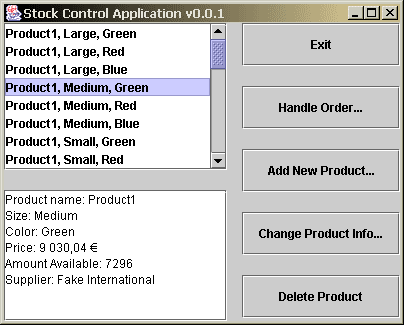
Figure 2-1. Product selection.
Other parts
Part 1 - The Main Window
Part 3. Window for Editing Product Information
Part 4. Menus and Confirmations
Part 5. Feedback questionnaire (compulsory)