



3.4.5 Document events
Document events refer to the read, modify and create events
concerning the documents of a workspace. Using the action
 in the action
menu of a folder, you may inspect the events pertaining to the documents
in this folder and all its subfolders and sub-subfolders. You may select
the documents that a certain member has created or modified
and let BSCW show you who has read these documents and how often.
You may also select the documents that a certain user has read
to view who has created these documents. Thus, you may investigate
questions like:
in the action
menu of a folder, you may inspect the events pertaining to the documents
in this folder and all its subfolders and sub-subfolders. You may select
the documents that a certain member has created or modified
and let BSCW show you who has read these documents and how often.
You may also select the documents that a certain user has read
to view who has created these documents. Thus, you may investigate
questions like:
- who has read the documents I created?
- which documents of the workspace have I read so far?
In addition, you may have the events concerning your current document selection visualized as a document event map. Document event maps are graphs where the nodes stand for documents and users, and the edges stand for the events, always connecting a document and a user node. The edges have different colours signalling different kinds of events: A green edge leading from user X to document D, e.g., stands for the event that user X has read document D. Red edges symbolize create events, yellow edges symbolize modify events. Figure 3.4-1 shows an example of an event map.
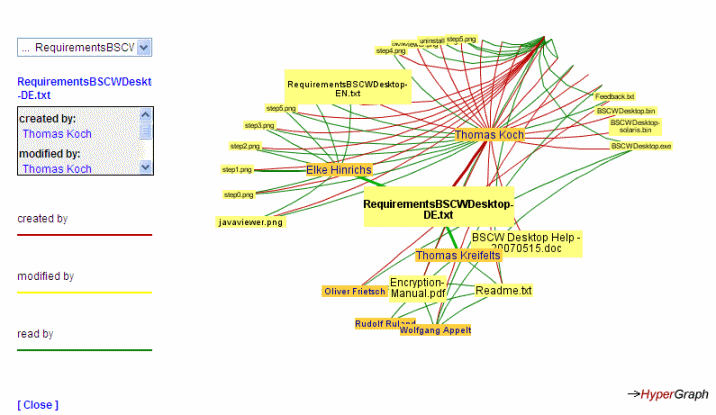
Figure 3.4-1: A document event map
You may get an overview of all document events in the current folder by having a look at a document event map that covers all documents of the current folder. Using this presentation, you may investigate questions like:
- who is a very active contributor to the workspace, i.e. who has created many documents or who has modified many documents?
- which documents are of most interest to workspace members, i.e. which documents have been read by many workspace members?
While any read access to a document, i.e. opening, archiving, copying etc., counts as a read event in document events, only replacing, revising and editing a document count as a modify events.
