



3.1.1 Header
Figure 3.1-1 shows the elements of the header section of a folder page.
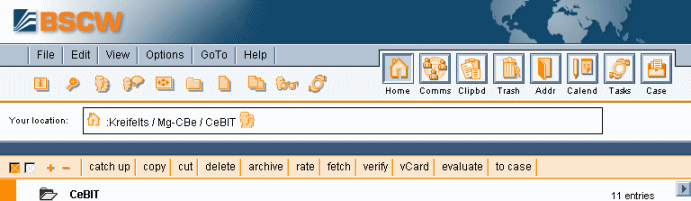
Figure 3.1-1: Header elements
The header section of a folder page — like the header section of a calendar page, of an address book page, etc. — has the following elements.
- The top menu bar

- contains the menus for creating and manipulating objects within the folder (or calendar, discussion, etc.). These actions are described in section 3.3.
- The action shortcuts

- consist of frequently used actions like creating objects, e.g., documents, subfolders or discussions, initiating a search or getting more information about the current folder.
- The instant access bar

- gives access to personal objects like your home folder, clipboard, trash, address book and calendar.
- The navigation bar

- specifies the location of the current object in your folder
hierarchy as
 :your-user-name / active workspaces.
The names in the directory path are links to the respective
folder pages.
:your-user-name / active workspaces.
The names in the directory path are links to the respective
folder pages. - The banner

- is empty by default; a banner consisting of text and graphics may be inserted individually for each folder, if so desired (see 4.3.4).
- The selection menu bar

- offers buttons for
- selecting
 or de-selecting
 all entries in the current page;
 - enabling
 or disabling
 the display of subfolders, when the option
is active (also cf.
4.2.3.2);
the display of subfolders, when the option
is active (also cf.
4.2.3.2); - applying the actions listed to the objects selected (check-marked).
- selecting
- The context menu
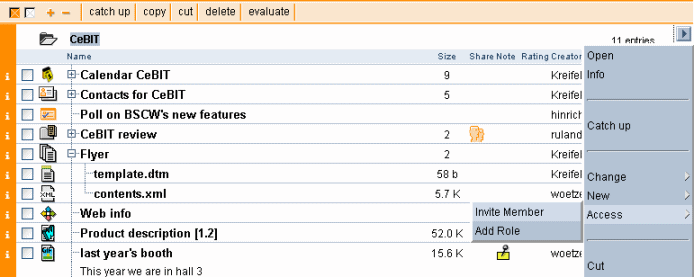
- (an action button
 at the lower right-hand corner of the header section of the folder page)
offers all actions that are applicable to the current folder.
at the lower right-hand corner of the header section of the folder page)
offers all actions that are applicable to the current folder.
