



11.6 Using the Document Generator
To start the Document Generator, you have to add a new document set by selecting in the top menu. You have to enter a name and an optional description as well as a character set in which the entities of the new document set will be coded. You may change this character set again using
To define entities in the folder hierarchy of a document set use in the top menu of the document set or its subfolders. You may specify the name and the value of a new entity or change an existing one. If the name field remains empty, the entity will be removed.
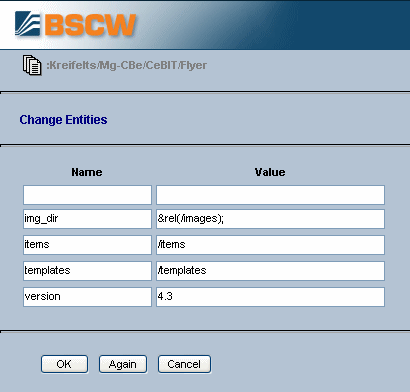
Figure 11.6-1: Defining entities
After you have generated the templates on your local computer and have them
uploaded to the document set (don’t forget to enter ‘Document
Template’ (text/x-bscw-template) as MIME type), you
may use  to set the evaluation parameters of the templates.
This lets you specify a template, into which the entities of the present template
are to be inserted, and the name of a document which is to be generated from the
present template. Internally the evaluation parameters are treated as entities
with the name @template@ and @document@,
respectively.
to set the evaluation parameters of the templates.
This lets you specify a template, into which the entities of the present template
are to be inserted, and the name of a document which is to be generated from the
present template. Internally the evaluation parameters are treated as entities
with the name @template@ and @document@,
respectively.
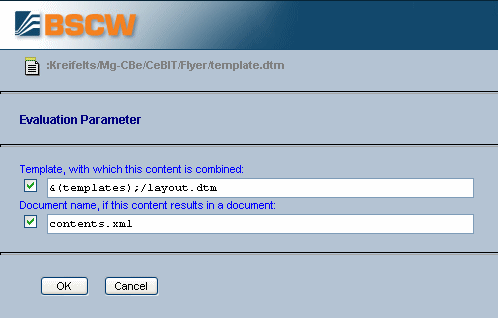
Figure 11.6-2: Defining the evaluation parameters
To view all entities of the document set, of one of its folder or of a template,
use
or
.
If an entity appears in italics it is inherited via the folder hierarchy.
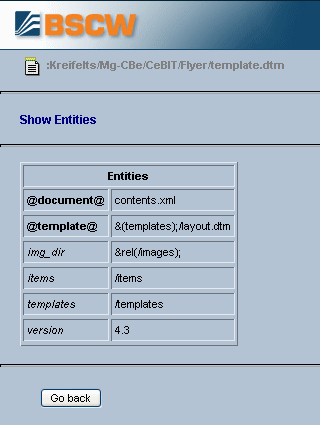
Figure 11.6-3: Displaying entities
The evaluation process may be started for the whole document set,
for one of its folders, a set of selected templates or single templates
using
,
or
, respectively.
Documents that have already been generated in prior evaluations will be
replaced.
For a backup of a document set you may save all entities with . This generates a file which you may save on your local computer. The file has the following syntax where ‘object path’ designates the path name of the object (folder, template) whose entities are stored within the document set.
'<object path>' = {
  '<entity name>' = '<entity value>'
  ...
}
...
With
you may import such entity backup files.
