



10.2 Mobile log-in to BSCW
The mobile log-in at the BSCW server is carried out using a special log-in page for mobile devices. The exact URL of this entry page depends on the configuration of your BSCW server. The entry address normally is as follows:
- access by WAP browser
- http://your-bscw-server/pub/mobile.wml
- access by mobile Web browser
- http://your-bscw-server/pub/mobile.html
Should you have questions about the specific configuration of your BSCW server, please contact your BSCW administrator.
Open the entry address (URL) for mobile access to BSCW in the browser of the mobile device. In doing so a connection to the network is established. It is recommended to store the address in the bookmarks of your mobile browser to simplify the next access. Depending on the method used for mobile access and on the mobile device used, the welcome page shown may vary (cf. figure 10.2-1 for an example).
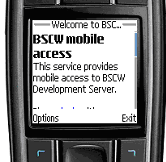
Figure 10.2-1: Mobile log-in to BSCW
Follow the ‘login’ link to enter the BSCW system — you will be asked for your user name and password. After successful authentication you will reach the mobile portal.
