



1.4.1 The folder page
The basic concept of BSCW is the workspace, which is — adopting Macintosh or Windows terminology — a folder
- for a specific group of registered users, represented by the group icon
 ,
who can
,
who can - read, edit, add, move and delete objects in this shared folder.
As a registered user of a BSCW server you may be a member in an arbitrary number of workspaces. You may create folders or other objects and share them as demanded by the tasks at hand.
In its Web-based user interface, BSCW presents the contents of a folder or workspace as the central part of a page — preceded by a header containing pop-up menus, buttons and action shortcuts.
Figure 1.4-1 shows a folder page with examples of the objects that you can create and share in BSCW. Please note that different icons are used to represent the different types of objects. In section 3.1, the structure of the folder page is explained in detail.
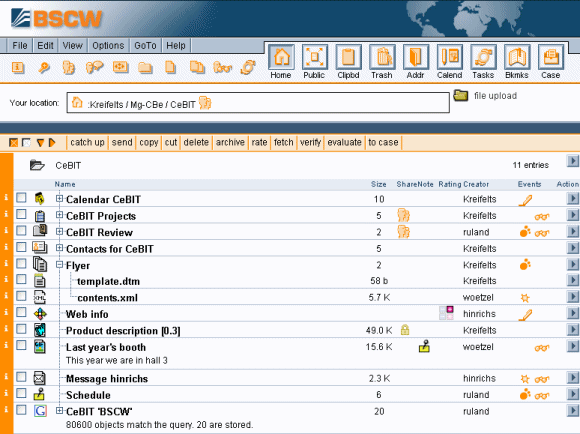
Figure 1.4-1: Example folder page
